

Someone generates a short AI video; it’s almost right, except the jacket should be yellow instead of red. With most video generation tools, fixing that means writing a new prompt and hoping the rest of the shot survives the regeneration intact — the lighting, the framing, the way the character moved. That specific frustration, having to redo a whole scene to fix one detail, is the actual problem Google built Gemini Omni to solve, and it’s worth understanding the real product before deciding whether it delivers on that promise.
This is a straight look at what Gemini Omni is, when it actually shipped, what it can genuinely do, what it costs in real numbers, and where it holds up against the competition and where it doesn’t.
What Gemini Omni Actually Is
Gemini Omni is the newest member of Google’s Gemini generative model family, and per Google’s own announcement, it’s built specifically to create output from any combination of input types, starting with video. You can feed it images, audio, video, and text together, and it generates a video grounded in Gemini’s broader reasoning rather than routing the request to a separate, disconnected media model bolted on the side.
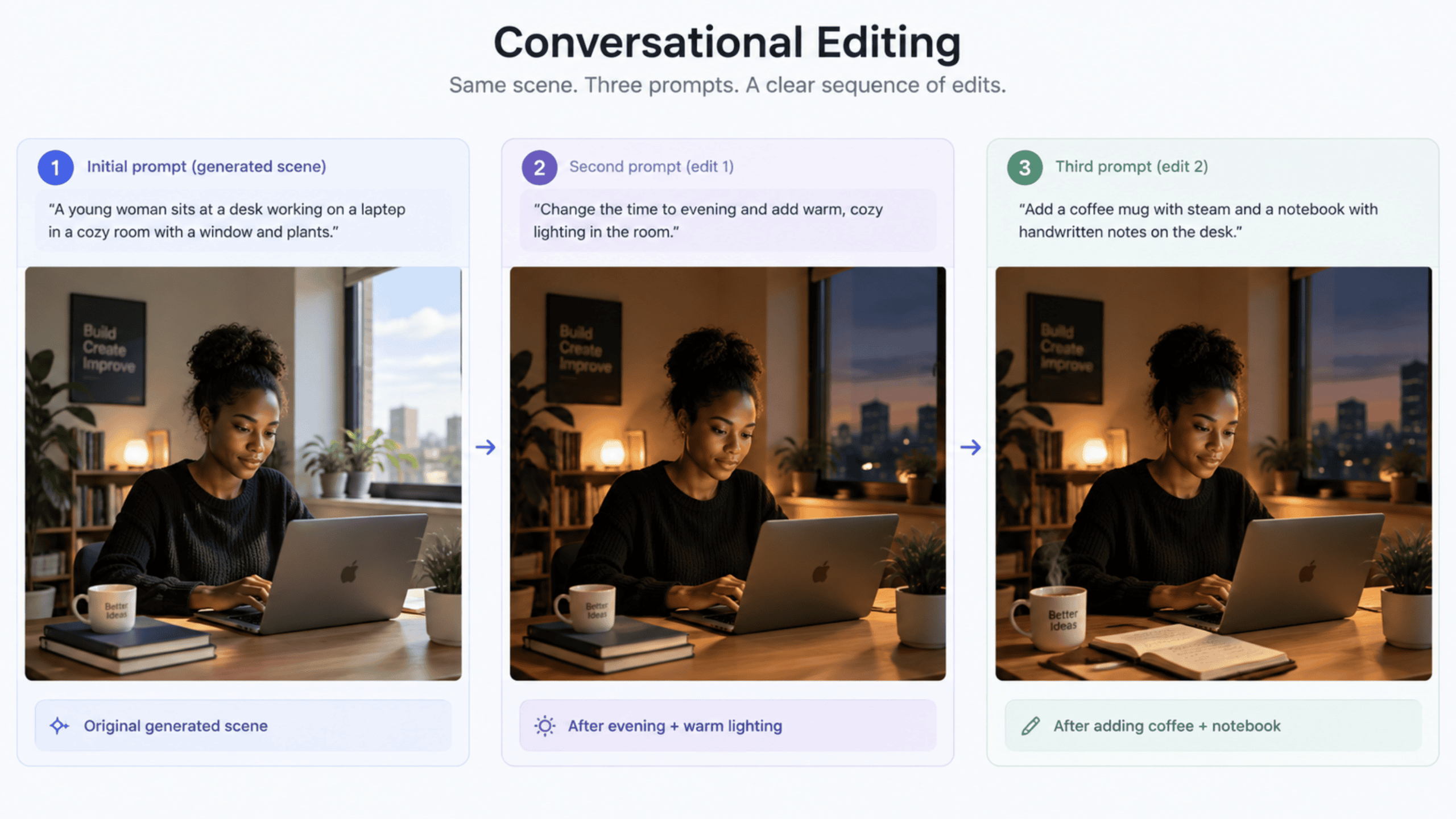
It’s worth being precise about where this sits next to Google’s other generative tools, since the names get confused easily. Nano Banana handles image generation and editing. Veo handles one-shot video generation from a prompt. Omni’s actual differentiator isn’t that it generates better-looking video than either of those — it’s that it lets you keep editing a video through natural conversation, turn after turn, while the model holds onto what you established earlier: the characters, the physics, the scene itself. That’s a genuinely different product category than “type a prompt, get a clip.”
The Release Timeline
Google announced Gemini Omni at Google I/O 2026 on May 19, 2026, in a post authored by Koray Kavukcuoglu, CTO of Google DeepMind and Chief AI Architect at Google. The first model in the family, Gemini Omni Flash, rolled out the same day to consumers through the Gemini app and Google Flow for subscribers on the Google AI Plus, Pro, and Ultra tiers, and at no cost through YouTube Shorts and the YouTube Create app.
Developer access came later. The Gemini API opened access to the model on June 30, 2026, still explicitly tagged as a preview release, under the model ID gemini-omni-flash-preview. The model reached general availability on August 27, 2026, as Gemini Omni 1.1 Flash, and that general availability release wasn’t just a version-number bump — it bundled real feature upgrades: scene extension that now analyzes the last ten seconds of a clip for continuity instead of just the final second, extensions stackable up to a total of 40 seconds, a cheaper 360p draft mode for fast iteration, and improved style and character reference handling from uploaded clips. Anyone citing a single “Gemini Omni release date” is collapsing three genuinely distinct milestones into one, and the difference matters if you’re trying to understand what was actually available when.
Core Capabilities
Native multimodality means the model processes text, image, audio, and video together as input, rather than handling each modality through a separate specialized path, which is what gives it more cohesive, consistent output than stitching several single-purpose tools together would produce.
Conversational editing is the headline feature: every follow-up instruction builds on the last one, tracked through an interaction ID rather than requiring you to re-upload or re-describe the video each time, and characters, physics, and scene continuity are meant to hold across that whole editing session. World-knowledge grounding is Google’s term for the model combining an intuitive sense of physics — gravity, fluid dynamics, momentum — with Gemini’s broader knowledge of history, science, and cultural context, which is what lets it produce something closer to meaningful storytelling than pure photorealistic pattern-matching.
On the generation side specifically, it supports straightforward text-to-video, image-to-video (turning a still photograph, sketch, or product shot into motion), and first-and-last-frame interpolation, where you supply a starting image and an ending image and the model animates a smooth transition between them. It also supports subject and style reference, letting you upload images or short video clips of a specific character, object, or visual style and have the model weave those into a new generated scene. And as of the August general availability release, video extension can add up to 40 seconds total onto an existing clip — generated by the model or uploaded — in successive 10-second increments.
The Model Behind It
It’s worth naming the actual model identifiers rather than speaking vaguely about “the Omni model,” since Google itself uses several names across its own documentation. The current, generally available model on the Gemini API is gemini-omni-1.1-flash. The original preview identifier, gemini-omni-flash-preview, still appears in Google Cloud’s own model card for the Gemini Enterprise Agent Platform, where it’s explicitly labelled a Generative AI Preview offering with its own separate terms.
On that enterprise platform specifically, the model card lists a 131,072-token maximum input and a roughly 57,920-token maximum output — real technical ceilings worth knowing if you’re planning a production integration rather than experimenting casually.
Here’s what’s worth being honest about rather than guessing at: Google hasn’t published a technical paper detailing Omni’s exact underlying architecture, the way it has for some other model releases. What’s confirmed is that it sits within the Gemini 3.x-era model family by both timing and Google’s own positioning, sitting in Google’s model documentation alongside Gemini 3.5 through 3.8 Flash variants. Beyond that, claims about its precise internal design would be speculation, and this article isn’t going to pretend otherwise.
How to Get Started
There are three genuinely separate on-ramps here, serving different audiences, and it’s worth being clear about which one actually fits your situation rather than defaulting to whichever is easiest to find.
For everyday use, the Gemini app and Google Flow are the two consumer paths, both included in a Google AI Plus, Pro, or Ultra subscription, alongside a completely free path through YouTube Shorts and the YouTube Create app — no subscription required for that specific route.
For developers, an API key from Google AI Studio and a short script against the Interactions API is the fastest path to testing it directly:
from google import genai

client = genai.Client()

# A single text-to-video call against the current GA model
interaction = client.interactions.create(
    model="gemini-omni-1.1-flash",
    input="A drone shot of a mountain landscape at sunrise."
)

with open("sunrise.mp4", "wb") as f:
    f.write(interaction.output_video.data)
client.interactions.create is the core call, and the model string is the one line that matters most to get right, since gemini-omni-1.1-flash is the current general availability identifier, while some existing tutorials and cached documentation still reference the older gemini-omni-flash-preview string from the June preview window. The response comes back as raw video bytes accessible through interaction.output_video.data, written directly to a file here, though for anything beyond a quick test, Google’s documentation recommends URI-based delivery instead of inline bytes, to avoid hitting payload size limits on larger outputs.
For enterprise teams already operating inside Google Cloud’s governance and billing structure, the Gemini Enterprise Agent Platform — the successor branding for what was Vertex AI — is the intended path, offering the same model behind Google Cloud’s existing access control and monitoring tooling.
Pricing
Here’s the actual rate card rather than a vague “it’s affordable” claim. On the Gemini API’s paid tier, input is billed at \$1.50 per million tokens, text and thinking output at \$9 per million tokens, and video output at \$17.50 per million tokens. Video is billed by a fixed conversion rate of 5,792 tokens per second of 720p output, which works out to roughly \$0.10 per second — a figure Google states directly on its own pricing documentation.
Worked out concretely, a 10-second 720p clip costs approximately \$1.01 in video output alone, before adding whatever small amount the input prompt and any reference images contribute at the much lower input rate. Unlike most other models in the Gemini lineup, Omni currently has no free tier on the API, so the very first test call a developer makes bills to their account, not a rate-limited trial allowance. The practical cost lever worth knowing is the 360p draft mode introduced in the August general availability update — meaningfully cheaper per second than 720p, and useful for iterating on a prompt before committing to a full-resolution render of the version you actually want to keep.
| Meter | Rate | What It Covers |
|---|---|---|
| Input tokens | \$1.50 per 1M tokens | Text prompts, reference images, video, or audio provided as input |
| Text/thinking output tokens | \$9.00 per 1M tokens | Any narrated text response accompanying the video |
| Video output tokens | \$17.50 per 1M tokens | The generated video itself, ~5,792 tokens per second at 720p |
| Worked example | ~\$1.01 | A single 10-second 720p clip, video output only |
How It Compares to Others
On the strengths side, Gemini Omni 1.1 Flash reached the top of LMArena’s community-voted text-to-video leaderboard as of late August 2026, and placed second on the image-to-video leaderboard, based on real, independently gathered preference data rather than a Google-selected benchmark. Its conversational, stateful editing is also a genuine structural advantage over one-shot generators like OpenAI’s Sora or Runway’s tools, where changing a single detail typically means writing an entirely new prompt and regenerating from nothing, hoping the parts you liked survive by chance rather than by design.
On the honest counterweight side, Omni’s per-second price is effectively identical to Google’s own Veo 3.1 Fast at the same \$0.10-per-second headline rate, so it isn’t winning on cost at all — it’s winning specifically on the editing workflow. A team that only needs a single, clean, one-shot generation with no follow-up revisions genuinely won’t see much practical advantage choosing Omni over Veo or a similarly priced competitor, since the price is the same and the differentiator that Omni is actually built around — iterative conversational editing — simply isn’t the thing they need.
Where It Falls Short
- Voice and dialogue editing aren’t supported yet; you can’t currently ask the model to change what a character in an uploaded video is saying. Uploading a separate audio reference isn’t supported in the current API version either; only voice references work today, with Google stating other audio input types are planned but not yet live.
- Editing or extending uploaded (as opposed to model-generated) videos isn’t currently available at all for users in the European Economic Area, Switzerland, or the United Kingdom — a real regional gap worth knowing before planning a workflow around it.
- Content involving minors or certain recognizable real people is restricted from both upload and editing, a deliberate policy choice rather than a technical limitation.
- Only English has been fully evaluated for prompting, so results in other languages may work but haven’t been systematically verified.
The Verdict
The fair verdict here isn’t about whether Gemini Omni generates impressive-looking video — several tools already do that convincingly. Its real contribution is making the editing process feel like an actual conversation instead of a fresh guess every single time, holding onto a scene’s characters, physics, and continuity across turns in a way one-shot generators structurally can’t.
Whether that’s worth its price and its current gaps — the regional restrictions, the missing voice editing — depends entirely on whether iterative editing is genuinely the bottleneck in your actual workflow, not on which demo reel happened to look more impressive on a given day.
Shittu Olumide is a software engineer and technical writer passionate about leveraging cutting-edge technologies to craft compelling narratives, with a keen eye for detail and a knack for simplifying complex concepts. You can also find Shittu on Twitter.